

.png)
The best idea of your week rarely arrives at a desk. It shows up mid-commute, between meetings, or ten minutes into a research interview, and by the time you find a notebook, half of it has slipped away.
DictaAI is now on iOS. Download it on your iPhone or iPad to record conversations, turn them into searchable transcripts, and analyze what was said with DictaLens.
You can get started directly in the app, but if you decide to upgrade, DictaAI subscriptions are available at a lower price when purchased through the website rather than through the App Store.
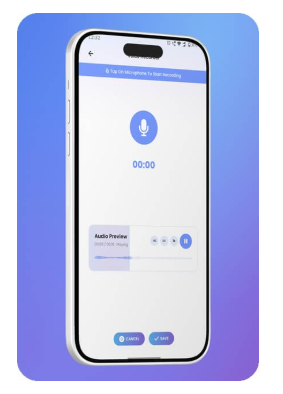
Open DictaAI, tap record, and start capturing. The audio lives in the same app that will transcribe it, so there is no file to export, rename, or hunt down later. No separate voice recorder required.
It works for the moments that matter:
Recording on your phone means you capture the conversation as it happens, not as you remember it afterward.
Already have recordings? Upload audio or video straight from your device, Google Drive, Dropbox, or YouTube. Files should stay under 1 GB, with audio no longer than five hours.
Every transcript comes with the details that make it usable:
Instead of replaying a 90-minute interview to find one answer, search for a keyword and go straight to the moment. For quotes you plan to publish or cite, check them against the original audio.
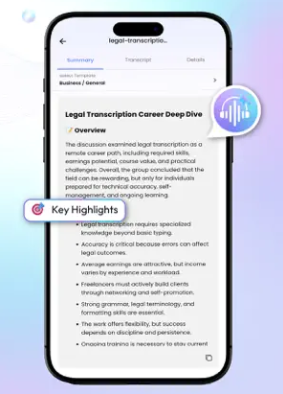
A transcript tells you what was said. DictaLens, DictaAI's AI analysis tool, helps you understand what that information reveals, whether you are working with one conversation or several files at once.
You can use DictaLens to:
Many general-purpose AI tools can fill gaps with information that sounds plausible but was never actually present in your source material. That is a serious problem when you are analyzing research interviews, client conversations, meetings, or other information where the exact source matters.
DictaLens is designed differently. It does not hallucinate beyond your selected source material. Its answers are based only on the transcripts and documents you provide.
That means if you ask what customers complained about, which concerns appeared repeatedly across interviews, or what decisions were made during several meetings, the response stays grounded in those files rather than introducing unrelated information.
This becomes even more valuable with Multi-File Intelligence.
Imagine completing five research interviews in the same week. Instead of reviewing each transcript separately, select them together and ask:
The same approach works across client meetings. Select several transcripts and look for repeated requests, unresolved questions, changing priorities, or decisions that evolved from one meeting to the next.
Because the analysis stays tied to your selected files, you can explore patterns across multiple conversations without losing sight of where the information actually came from.
That is the bigger shift with DictaAI on iOS: your iPhone or iPad is not just a place to capture conversations. It can be the starting point for turning individual recordings into connected, source-grounded insights you can actually trust and use.
Also Read: How AI Hallucinations Can Impact Your Business and How to Prevent It
Not every meeting happens in a room, and DictaAI handles both kinds:
Connect your Google Calendar and Notetaker can join scheduled meetings automatically. Setup steps are in the Notetaker guide. Notetaker is not part of the free Basic plan, so check your plan before counting on it for AI meeting transcription.
Either way, your recordings and transcripts end up in the same place.
Also Read: Your Company Has Thousands of Meeting Transcripts. Now What?
DictaAI runs on iPhone, iPad, Android, and the web, so your work follows you. A typical day might look like this:
Sign in with the same DictaAI account and your recordings, transcripts, and analysis stay connected, whether you are at a desk or on the move.
The Basic plan includes 60 free transcription minutes every month, a good way to test the whole workflow on a real meeting or interview.
Big ideas do not wait until you are at your desk. Neither should your transcription and analysis tools. With DictaAI on iOS, recording, transcription, and AI-powered analysis now fit in your pocket.
Download the app, record your next conversation, and see what is inside it.
Download DictaAI on the App Store: Get 60 Free Transcription Minutes Every Month
Also available on Android.
Is DictaAI available for both iPhone and iPad?
Yes. DictaAI works on iPhone and iPad running iOS or iPadOS 15.1 or later.
Is the DictaAI iOS app free to download and use?
The app is free to download, and the Basic plan includes 60 free transcription minutes every month. Paid plans add more minutes and features.
What features are available in the DictaAI iOS app?
You can record conversations, upload audio and video, get transcripts with speaker identification and timestamps, and analyze them with DictaLens. DictaAI Notetaker for online meetings is available on paid plans.
Can I access my DictaAI recordings and transcripts across different devices?
Yes. Sign in with the same DictaAI account on iPhone, iPad, Android, or the web to keep working with your material.
Does DictaAI support multilingual transcription on iPhone and iPad?
Yes. DictaAI supports multiple languages, including mixed-language options such as Hinglish, though results depend on audio quality.

.png)


Comments
Glynnis Campbell
This is a test comment!