
The meetings most worth documenting are often the ones you least want mishandled.
A leadership call may contain financial forecasts. An HR meeting can include employee information. A client discussion may cover contracts, pricing, strategy, or product plans.
An AI meeting assistant can save hours of manual note-taking, but convenience is only half the decision. When sensitive conversations are involved, choosing a secure AI notetaker means understanding what happens to the recording before, during, and after the meeting.
Security should be evaluated as seriously as transcription quality.
Before comparing tools, classify the meeting.
Not every conversation needs a complete recording and transcript.
A routine project update is different from:
For highly confidential discussions, your organization's policy may require additional approval or may prohibit recording entirely.
A good AI notetaker for business should fit your governance process, not override it.
A privacy-focused AI notetaker is not secure simply because its website says “enterprise” or “private.”
Security depends on the entire data lifecycle.
Before adopting an AI notetaker for confidential meetings, find out:
If the vendor cannot answer those questions clearly, productivity features should not be the deciding factor.
A secure AI meeting assistant should protect information while it moves between systems and while it is stored.
DictaAI states that files and transcripts are protected using TLS 1.2+ for transmission and AES-256 encryption at rest. It also states that users can permanently delete files and that uploaded customer data is not sold or used to train AI models.
Those controls are relevant, but every organization should evaluate them against its own security requirements.
If your company requires formal security certifications, independent audit reports, specific hosting locations, contractual clauses, or a data processing agreement, verify those separately before deploying any AI meeting transcription software.
This question should be near the top of any vendor review:
Will our recordings, transcripts, or summaries be used to train AI models?
Meeting recordings can contain far more sensitive information than a typical document.
A single call may reveal:
Understanding a vendor's model-training policy is therefore a core part of AI meeting data privacy.
DictaAI publicly states that uploaded files and transcripts are not used to train its AI models.
Even a technically secure platform can create problems if participants are recorded without the appropriate notice or permission.
Recording and consent requirements vary depending on jurisdiction, meeting type, organizational policy, and the people involved.
A responsible confidential meeting transcription workflow should therefore include a clear process for:
DictaAI Notetaker joins supported Zoom, Google Meet, and Microsoft Teams meetings as a bot, and the meeting host must approve its entry.
That supports transparency, but it does not replace any legal or organizational consent requirement.
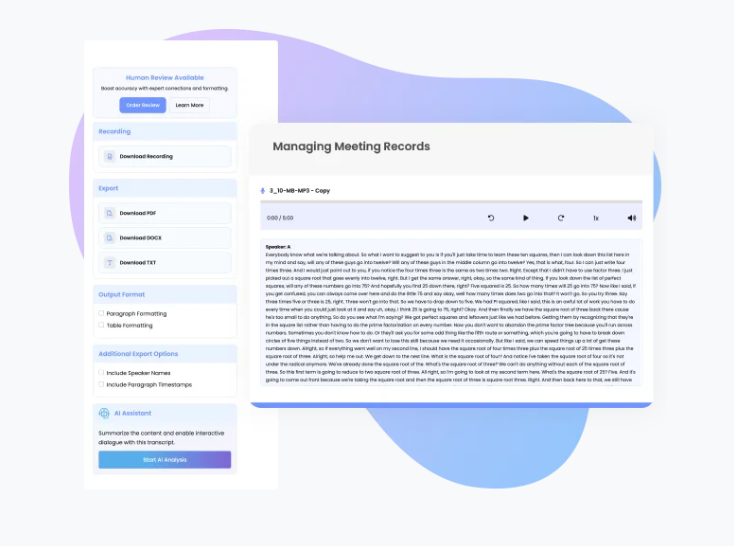
Security does not stop when the call is over.
The transcript, recording, summary, and AI meeting notes may remain useful for weeks or months, which also means they remain sensitive.
Ask:
DictaAI's Business plan currently includes team collaboration tools and a team admin dashboard.
Organizations with strict need-to-know requirements should still test the actual sharing and access behavior before placing highly confidential meetings into a shared workspace.
Meeting transcripts can contain phone numbers, email addresses, account details, addresses, and other personally identifiable information.
Automated PII redaction can reduce unnecessary exposure when people work from the transcript.
DictaAI includes its Privacy Shield PII-redaction capability across its current plans.
That is useful, but redaction should not be treated as a guarantee that every sensitive detail has been removed.
It also does not change the sensitivity of the original recording.
For important workflows, review redaction results and continue applying appropriate access, retention, and deletion controls.
Security should not mean choosing a tool nobody wants to use.
A good business meeting transcription software workflow should reduce administrative effort while keeping the information usable.
Useful features can include:
DictaAI Notetaker supports Zoom, Google Meet, and Microsoft Teams, while DictaLens can analyze resulting transcripts and supporting documents.
This means the platform can function as more than an AI meeting summarizer. Teams can use DictaLens to ask questions about meeting content, extract decisions and action items, and compare information across multiple files.
Also Read: Best Meeting Minutes Generators: 6 AI Tools Compared
A polished summary is not useful if the AI adds something nobody actually said.
That becomes particularly important in:
DictaLens is designed to answer questions from the selected source files rather than introducing unrelated outside information.
This reduces the risk of unsupported details entering the analysis, but important decisions should still be checked against the underlying transcript or recording.
AI can help organize the evidence.
Humans remain responsible for determining what the meeting actually means.
One of the easiest ways to reduce exposure is not to keep sensitive information longer than necessary.
Before implementing secure meeting transcription, define:
DictaAI states that users can permanently delete files from their account.
Your organization's own retention policy should determine when that happens.
Security claims need context.
A vendor may use strong encryption and still not meet your organization's specific requirements.
Before choosing a secure AI notetaker, evaluate:
For a high-risk environment, involve IT, security, privacy, legal, or compliance stakeholders before rollout.
That review is part of selecting the tool, not a step to add after deployment.
Do not make the first test an executive strategy meeting.
Start with a lower-risk internal call.
Test:
That pilot will tell you more about the real workflow than a product demo.
It also helps determine whether a tool marketed as a secure AI meeting assistant actually fits the way your organization works.
There are situations where manual notes may still be the better choice.
AI notetakers can preserve far more detail than a human note-taker, which is useful for accountability and follow-up.
But complete recordings also create a more extensive record of the conversation.
Manual notes capture less information, but that may be intentional for certain confidential discussions.
The right approach depends on the meeting.
The goal should not be to record everything simply because the technology makes it possible.
Also Read: How AI Notetakers and Business Transcription Services Save You Hours After Every Sales Call
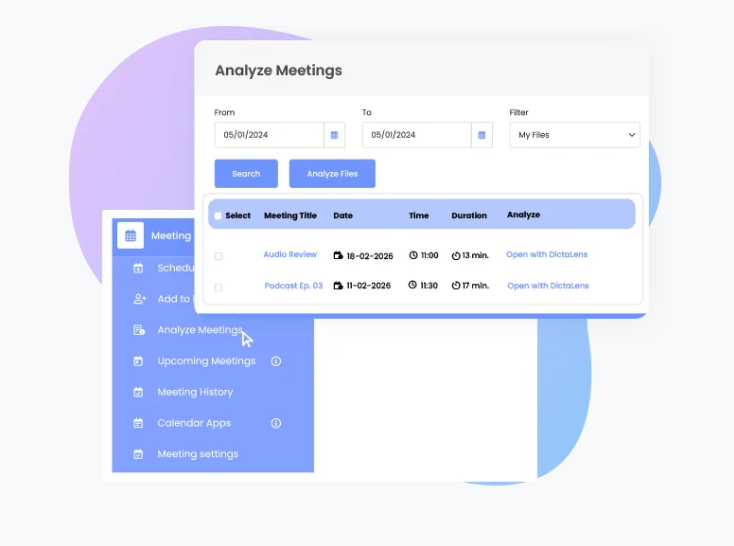
DictaAI combines Notetaker, transcription, PII redaction, DictaLens analysis, team collaboration tools, and optional Human Review within the same platform. The Business plan includes automated meeting capture for supported Zoom, Google Meet, and Microsoft Teams calls.
For accuracy-sensitive records, DictaAI's Human Review option adds professional proofreading to the AI transcript.
For organizations evaluating an AI notetaker for confidential meetings, that creates a useful workflow:
Capture → Transcribe → Review → Analyze → Control access → Delete when no longer needed
But no platform should be treated as automatically suitable for every confidential meeting.
The organization's own security, privacy, consent, retention, and contractual requirements still come first.
A secure AI notetaker should make meetings easier to capture and review without creating new uncertainty around sensitive information.
DictaAI brings meeting transcription, summaries, PII redaction, Human Review, and DictaLens analysis into one workflow, with documented encryption and a policy against using uploaded customer files to train its AI models.
Start with a lower-risk meeting, test how the workflow fits your security and privacy requirements, and scale from there.
Basic plan perk: 60 minutes free every month! Record, Transcribe, Analyze. Sign Up Now!
Are AI notetakers safe for confidential business meetings?
They can be appropriate for some confidential workflows, but safety depends on the vendor's technical controls and your organization's own requirements. Review encryption, access, retention, deletion, model-training policies, consent, and contractual safeguards before use.
What makes a privacy-focused AI notetaker different?
A privacy-focused AI notetaker should clearly document how it protects recordings and transcripts, whether customer information is used for model training, how access is controlled, and how data can be retained or deleted.
Can a secure AI notetaker replace manual meeting notes?
Not in every situation. Automated capture provides a more complete record, but some organizations may intentionally avoid recording particularly sensitive meetings. The appropriate method depends on the confidentiality level and internal policy.
What should I check before choosing AI meeting transcription software?
Review data encryption, storage, access controls, deletion, retention, AI training policies, consent procedures, PII handling, transcript accuracy, and whether the tool fits your organization's compliance requirements.
Does DictaAI support confidential business meeting workflows?
DictaAI provides encryption in transit and at rest, PII redaction, file deletion controls, a policy against training AI models on uploaded customer data, Notetaker support for major meeting platforms, and DictaLens analysis. Organizations should still assess those capabilities against their own security and confidentiality requirements.

.png)
Comments
Glynnis Campbell
This is a test comment!