
Taking notes during a meeting is one thing. Turning a 45-minute conversation into clear decisions, action items, owners, and information your team can actually find later is another.
That is where an AI meeting minutes generator becomes useful. A lot of tools can capture meetings, create transcripts, summarize discussions, and pull out next steps without someone spending another 30 minutes cleaning up handwritten notes.
We compared six popular options for 2026 based on meeting capture, summaries, action items, platform support, search and analysis, collaboration, and overall usability.
A transcript alone is not meeting minutes.
Useful AI meeting notes should make it easy to understand what happened and what happens next. Depending on the meeting, that may include:
The strongest tools increasingly combine the functions of an AI meeting note taker, transcription platform, and AI meeting summarizer. The difference comes down to what they let you do with that information afterward.
DictaAI combines automated meeting capture with transcription, summaries, and post-meeting analysis.
DictaAI Notetaker works with Zoom, Google Meet, and Microsoft Teams. Google or Microsoft calendars can be connected so the Notetaker automatically joins scheduled meetings. Once the meeting ends, users receive a transcript and summary.
Key features:
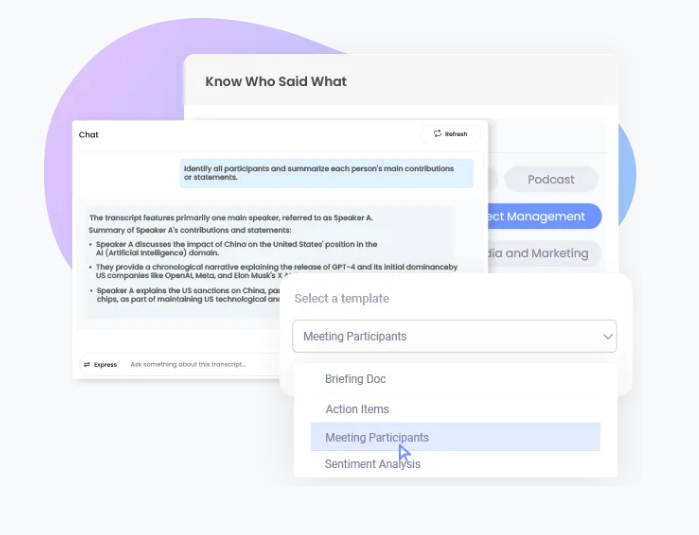
One interesting difference is what happens after the minutes are generated. DictaLens can analyze transcripts and supporting PDFs to surface summaries, decisions, action items, sentiment, and broader insights.
Best for: Businesses and teams that want meeting minutes plus deeper analysis of the information captured.
Consideration: Its broader analysis features will be most useful to teams that regularly need to revisit and work with meeting knowledge rather than simply save a recap.
Also Read: How AI Notetakers and Business Transcription Services Save You Hours After Every Sales Call
Otter AI is a familiar option for teams that want automated transcription and searchable meeting notes.
Its AI Notetaker can automatically join scheduled Zoom, Google Meet, and Microsoft Teams meetings through calendar connections. It generates summaries, key takeaways, and action items, while users can search previous meeting history to locate specific discussions.
Key features:
Best for: Individuals and teams primarily looking for reliable transcription, summaries, and easy access to past meetings.
Consideration: Teams needing broader document-based analysis may want to compare Otter's workflow with platforms designed to analyze meeting transcripts alongside other business files.
Fireflies.ai combines meeting transcription with summaries, action items, search, and conversation intelligence.
It can capture Zoom, Google Meet, Microsoft Teams, and other web-conferencing calls. Users can also record in-person conversations through desktop or mobile options and upload existing audio or video files.
Key features:
Fireflies also provides AskFred for asking questions about meetings and offers topic tracking and other conversation-analysis capabilities.
Best for: Teams that want flexible recording options and a broad meeting workflow.
Consideration: Its extensive feature set may be more than necessary for users who only want simple minutes after occasional meetings.
Fathom focuses on capturing conversations and quickly turning them into useful post-meeting information.
It connects with Zoom, Google Meet, and Microsoft Teams and provides AI-generated meeting summaries. Its settings also include automatic action-item extraction on supported plans.
Key features:
Best for: Professionals who want a relatively straightforward way to capture calls and receive organized recaps afterward.
Consideration: Some advanced capabilities, including automatic action-item generation, depend on the selected plan.
tl;dv combines recording and AI meeting notes with a stronger focus on team collaboration, CRM workflows, and insights across multiple meetings.
It works with Zoom, Google Meet, and Microsoft Teams and generates recordings, transcripts, summaries, and action items. It can also analyze multiple conversations to identify recurring topics and trends.
Key features:
Best for: Sales, customer success, and other teams that want to analyze patterns across repeated customer conversations.
Consideration: Teams interested mainly in basic meeting minutes may not need its broader sales and workflow capabilities.
Fellow takes a slightly different approach. Along with transcription and AI-generated recaps, it focuses heavily on the broader meeting workflow.
Its Note Taker works across Google Meet, Zoom, and Microsoft Teams, while Fellow also offers botless desktop recording, Zoom native capture, and mobile recording. Meeting recaps can include the recording, transcript, AI summary, and suggested action items.
Key features:
Best for: Teams that want meeting preparation, documentation, and follow-up managed within one broader system.
Consideration: Users who only need transcription and automatic minutes may find its meeting-management approach more comprehensive than necessary.
| Tool | AI Summaries | Action Items | Major Meeting Platforms | Broader Analysis | Best For |
|---|---|---|---|---|---|
| DictaAI | Yes | Yes | Zoom, Meet, Teams | Multi-file insights, sentiment, decisions, project updates, transcript + PDF analysis | Meeting knowledge and deeper analysis |
| Otter.ai | Yes | Yes | Zoom, Meet, Teams | Meeting search and AI chat | Straightforward meeting notes |
| Fireflies.ai | Yes | Yes | Zoom, Meet, Teams | Conversation intelligence | Flexible meeting workflows |
| Fathom | Yes | Yes * | Zoom, Meet, Teams | Meeting-focused | Simple automated recaps |
| tl;dv | Yes | Yes | Zoom, Meet, Teams | Multi-meeting insights | Sales and customer-facing teams |
| Fellow | Yes | Yes | Zoom, Meet, Teams | Search and Ask Fellow | Structured meeting management |
*Feature availability can depend on plan. Product features change frequently, so confirm current capabilities before choosing a platform.
Also Read: How AI Notetakers and Business Transcription Services Save You Hours After Every Sales Call
Getting a summary five minutes after a meeting is useful.
Finding why a decision was made three months later is where things get interesting.
Traditional minutes often follow a simple path:
Meeting → Notes → Storage
Then another meeting happens. And another. Eventually, important decisions, client concerns, and commitments are scattered across dozens of documents.
AI tools are beginning to change that workflow:
Meeting → Transcript → Summary → Analysis → Searchable Knowledge
This is an important distinction when comparing tools.
For example, Otter offers searchable meeting history, Fireflies lets users search meetings and ask questions, tl;dv provides aggregated insights across conversations, and Fellow keeps recordings and notes searchable.
DictaAI takes a particularly interesting approach with DictaLens because teams can analyze meeting transcripts alongside PDFs. That means a conversation does not have to remain isolated from the reports, project files, or other documents connected to it.
That makes DictaAI a strong option when the goal is not simply creating minutes, but continuing to use the knowledge captured during meetings.
Also Read: The Smart Way to Transcribe Meeting Minutes for Effective Note-Taking
Yes. Modern meeting tools can identify commitments and turn them into meeting minutes with action items.
A useful output might look like:
Decision: Launch the updated onboarding process in September.
Action item: Finalize the onboarding checklist.
Owner: Alex
Deadline: August 28
Context: The team wants the checklist ready before staff training begins.
This is far more useful than a generic bullet saying, “Discussed onboarding.”
Still, automated extraction deserves review. A casual suggestion can sound like a commitment, and a deadline may be implied rather than explicitly agreed upon.
Important owners, deadlines, financial decisions, or client commitments should be checked against the transcript or recording before the minutes become the team's official reference.
Good meeting minutes should do more than recap what happened. They should make decisions easier to find, action items easier to track, and important conversations easier to revisit later.
DictaAI brings meeting capture, AI summaries, action items, and DictaLens analysis into one workflow, helping teams turn conversations into searchable, usable knowledge.
What is the best AI meeting minutes generator in 2026?
The best tool depends on your workflow. DictaAI is a strong choice for teams that want transcription, summaries, action items, and deeper meeting and document analysis. Other options such as Otter, Fireflies, Fathom, tl;dv, and Fellow offer different strengths around meeting capture, integrations, collaboration, and workflow management.
Can AI automatically generate meeting minutes with action items?
Yes. AI meeting tools can identify key discussion points, decisions, tasks, owners, and deadlines when those details are clearly stated. Important action items should still be reviewed before being treated as final.
What is the difference between an AI meeting note taker and an AI meeting summarizer?
An AI meeting note taker captures and organizes information during or after a meeting. An AI meeting summarizer focuses on condensing the conversation into its most important points. Many modern platforms combine both functions.
Can AI generate meeting notes from Zoom, Google Meet, and Microsoft Teams?
Yes. All six tools covered here support meeting workflows across Zoom, Google Meet, and Microsoft Teams in some form, although recording methods and feature availability vary by platform and plan.
How accurate are AI-generated meeting minutes?
Accuracy depends on recording quality, background noise, accents, overlapping speakers, terminology, and how clearly decisions or tasks are stated. Transcription accuracy and summary accuracy are also different, so important details should be verified against the source conversation.


Comments
Glynnis Campbell
This is a test comment!