

Modern AI transcription services do more than turn audio into a wall of text. The best ones also figure out who is talking, and when, so a recording of five people in a meeting doesn't read like one long unbroken paragraph.
That's speaker identification. It separates and labels different voices in a recording, and it matters most in meetings, interviews, podcasts, research sessions, and customer calls where more than one person is talking.
Speaker identification is the process an AI transcription service uses to figure out who is speaking during each part of a recording. Instead of one continuous block of text, the system tags sections with labels like Speaker 1, Speaker 2, and so on.
This matters most in conversations with several people. A two-person interview is easy enough to follow without labels. A four-person focus group is not. Speaker labels turn a long, dense recording into something a reader can scan and actually use.
These two terms get used interchangeably, but they're not quite the same thing.
Diarization is the process of separating audio based on when the speaker changes. It answers one question: who spoke when? Identification goes a step further. It connects those separated voice segments to specific labels or names.
In short, diarization separates the voices. Identification assigns them an identity. Most AI transcription services,use both technologies together to produce a transcript that's both segmented and labeled.
1. Audio upload or meeting capture The process starts when a user uploads an audio or video file, or when DictaAI captures a meeting directly through a supported integration. From there, the system prepares the recording for analysis.
2. Audio preprocessing Background noise gets reduced where possible, and the recording is broken into smaller segments. The system separates actual speech from silence and background sound. Cleaner audio at this stage leads to a stronger transcript later.
3. Voice activity detection The AI pinpoints the exact moments speech starts and stops. Pauses, silence, and non-speech sounds get excluded, so the transcription engine only processes the parts that matter.
4. Speaker change detection The software analyzes shifts in voice characteristics like pitch, tone, speaking rhythm, vocal energy, and pronunciation patterns to detect when one speaker stops and another begins.
5. Voice feature analysis Each voice segment gets converted into a numerical representation, sometimes called a speaker embedding. Similar segments are grouped together based on these voice patterns, not the meaning of the words themselves.
6. Speaker clustering Segments that appear to belong to the same person get placed into a group and given a temporary label, such as Speaker 1 or Speaker 2. The system keeps comparing segments throughout the recording, even across long conversations with repeated speaker changes.
7. Speech to text conversion Once speakers are separated, the spoken words get converted into written text. Each section links back to its speaker label, and timestamps get added so the transcript is easy to navigate.
8. Speaker naming and review Generic labels can be swapped for real names. Speaker 1 becomes Sarah, Speaker 2 becomes David, and so on. Human review still matters here, especially when speakers sound similar, several people talk over each other, audio quality is poor, or interruptions are frequent.
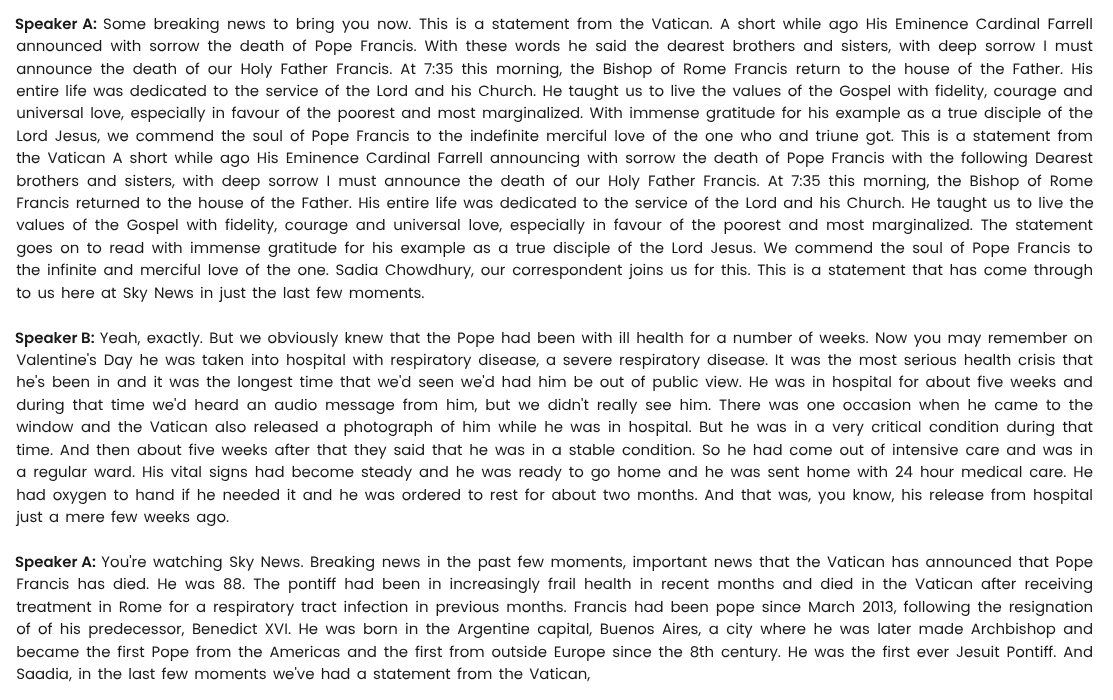
DictaAI combines speech to text transcription with speaker separation to turn complex, multi-person conversations into transcripts that are actually readable. That includes automatic speaker labels, timestamps, searchable text, editable speaker names, and support for both audio and video files.
For meetings specifically, the DictaAI Notetaker captures conversations across Zoom, Google Meet, and Microsoft Teams and organizes them into structured, speaker-labeled records. From there, users can move from a raw recording to something they can search, summarize, and act on.
Speaker labels make conversations easier to follow and prevent confusion about who said what. They cut down the time spent manually formatting transcripts and make it faster to locate a specific quote, decision, or question. They also make AI-generated summaries and insights more accurate, since the system knows exactly who contributed which point.
Business meetings benefit from separating managers, employees, clients, and stakeholders so decisions and responsibilities stay clear. Research interviews use speaker separation to distinguish interviewer from participant, which makes coding and thematic analysis faster. Focus groups rely on it to compare opinions across several participants without losing context. Podcasts and media interviews use it to produce clean, quotable transcripts with hosts and guests clearly marked. Customer service calls use it to separate the customer from the representative for quality review and training. Legal and professional conversations use it to clarify who made each statement, though sensitive material like hearings and consultations should always go through human verification before being treated as final.
Accuracy depends on the number of speakers, audio quality, microphone placement, and background noise. Overlapping speech, similar-sounding voices, strong accents, and speakers moving away from the microphone can all reduce accuracy. Very short responses like "yes" or "okay" are harder to attribute correctly, and frequent interruptions add another layer of difficulty.
A good microphone and a quiet recording environment go a long way. Keep microphones close to speakers, ask participants to avoid talking over one another, and use separate microphones when possible. A clear introduction at the start of a recording helps too. After transcription, review and rename speaker labels, and use an AI transcription service built specifically for multi-speaker audio rather than a basic tool designed for single-voice recordings.
Not automatically. AI can separate voices reliably, but knowing who those voices belong to is a different problem. Unless a platform has enough context, generic labels usually need to be renamed manually. This also raises a privacy question worth keeping in mind: voice profiles and speaker recognition data should be handled carefully, and speaker names should always be reviewed before a transcript is published or shared.
Accurate speaker labels make everything downstream more useful. With DictaLens, DictaAI's AI transcription analytics tool, users can examine what each participant asked, which decisions were made, recurring concerns, individual contributions, and follow-up tasks, all tied back to the right speaker.
AI speaker identification isn't perfect on every recording. Difficult audio can lead to incorrectly grouped or swapped speakers. For published interviews, academic research, legal content, medical discussions, or important business records, human review remains an important step before a transcript goes out the door. DictaAI is built to accelerate the heavy lifting, not to remove the need for a final read-through.
Speaker identification works by separating voices, detecting speaker changes, and assigning labels that turn a messy recording into a structured, readable transcript. Combined with timestamps, AI-powered insights, and advanced speech recognition software, it's what separates a genuinely useful AI transcription service from a tool that just converts speech to text.
Whether you're transcribing meetings, interviews, podcasts, or research recordings, DictaAI combines advanced speech recognition software with intelligent speaker identification to deliver accurate, searchable, and easy-to-review transcripts. Have a recording sitting on your device? Put DictaAI to work and turn conversations into actionable insights.
It's the process of detecting different voices in a recording and labeling which parts of the transcript belong to which speaker, making multi-person conversations easier to read.
It analyzes shifts in voice characteristics like pitch, tone, and speaking rhythm to detect the moment one speaker stops and another begins.
Not quite. Diarization separates the audio by speaker change. Identification takes it further by assigning those separated segments a name or label.
Not automatically in most cases. AI can distinguish separate voices, but assigning real names typically requires manual review unless the platform has enough context to do it on its own.
Accuracy depends on audio quality, background noise, the number of speakers, and how much they overlap or interrupt one another. Clear audio with distinct voices produces the strongest results.




Comments
Glynnis Campbell
This is a test comment!